

For flag football coaches
Playbook, call sheet and game logging in one app.
Draw your plays, build a call sheet from them and just tap it during the game. Those taps become a report: what you called, what came of it and against whom.
No card. Nothing is charged when the trial ends — we get in touch.
Four things that belong together. Finally in one place.
Plays go from the playbook into the call sheet, from the call sheet into the game log and from the log into the report. Nothing is retyped, nothing is lost between programs, and on Tuesday you know what did not work on Saturday.
Features
From drawing plays to the game report.
Six things a flag football coach does every week. All in one place, each one feeding the next.
Playbook
Drawing plays with formations, routes and player marks. Your own set, kept by the team.
Call sheet
Plays into boxes, colours, two sides of the sheet. Prints on a page and on a wristband.
Game logging
A wizard you tap through: play, result, yards, players. Works on the field with no signal.
Report
What you called and what came of it — by play, situation, field zone and player.
Practices
A minute-by-minute schedule, a drill library, attendance and an archive of past practices.
Scouting
The opponent’s plays, their tendencies and a map of where they throw. Before and after.
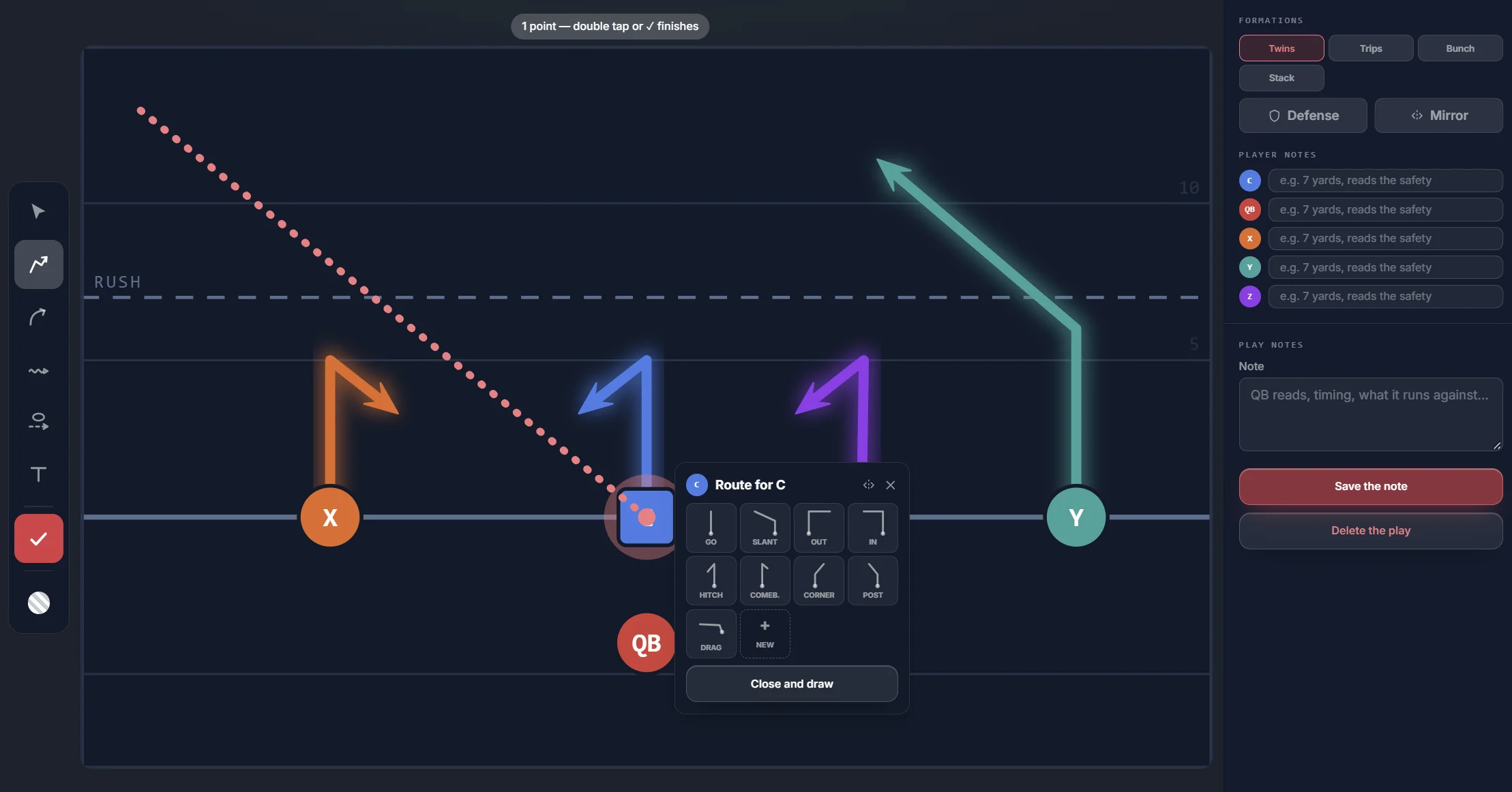
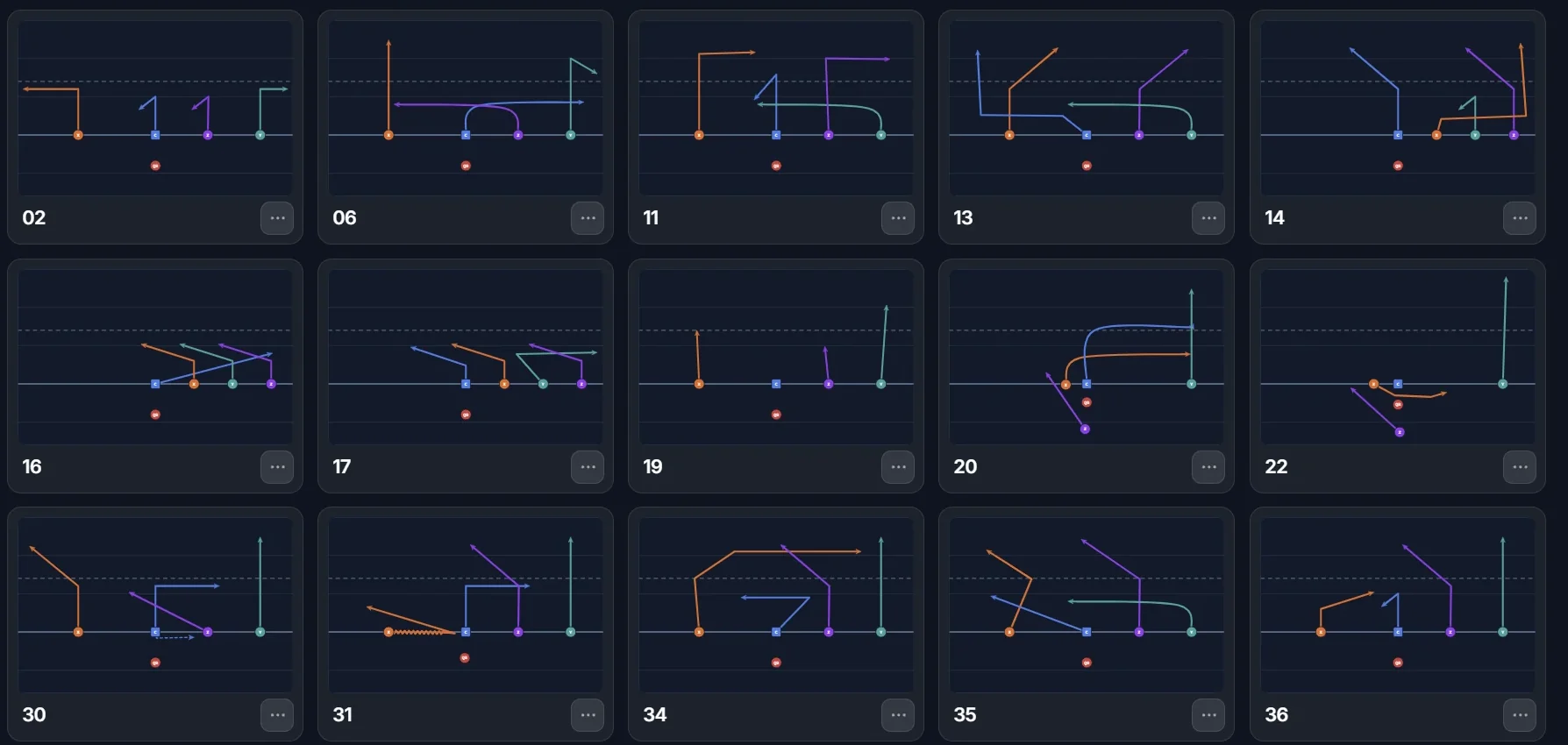
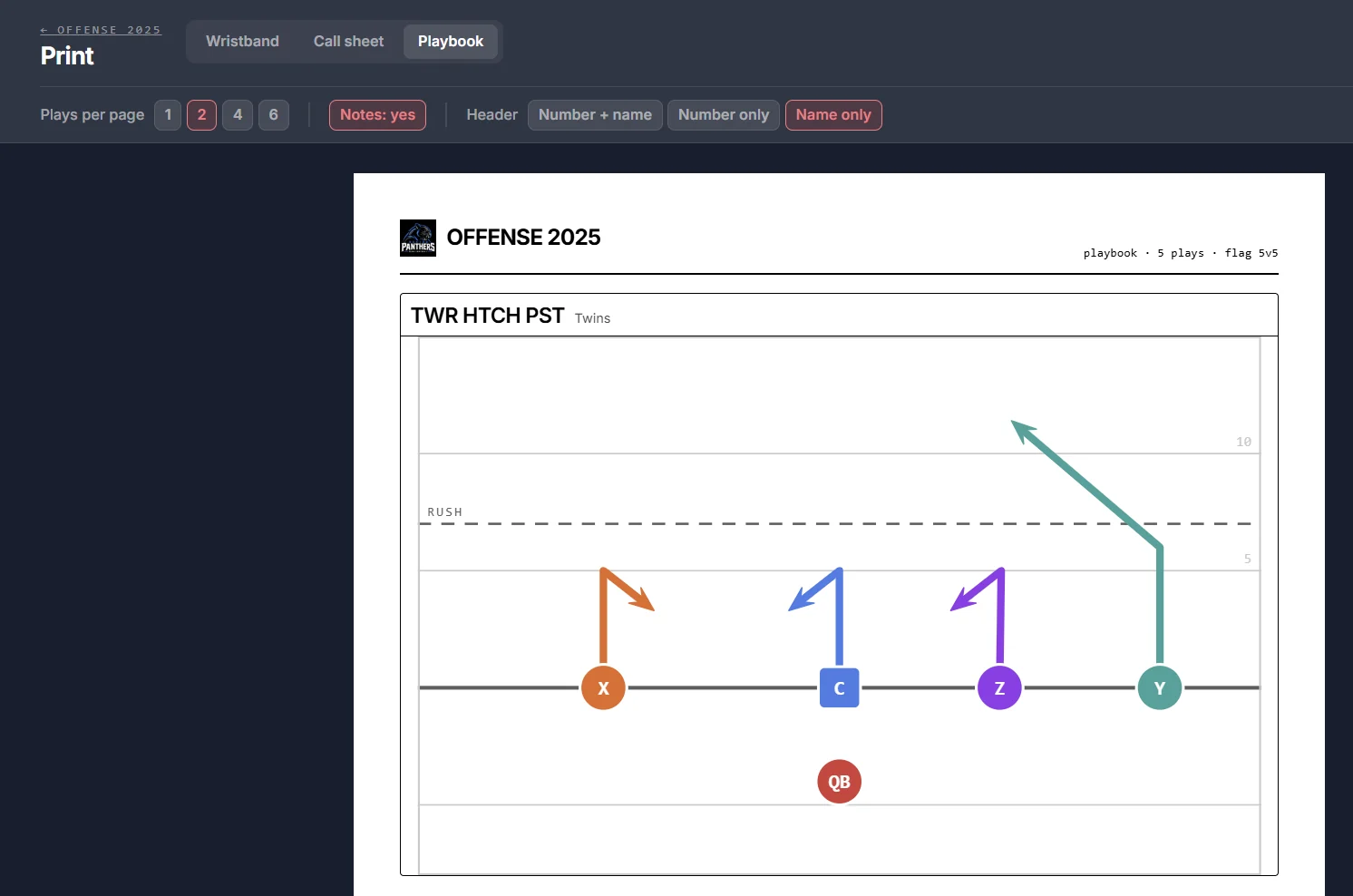
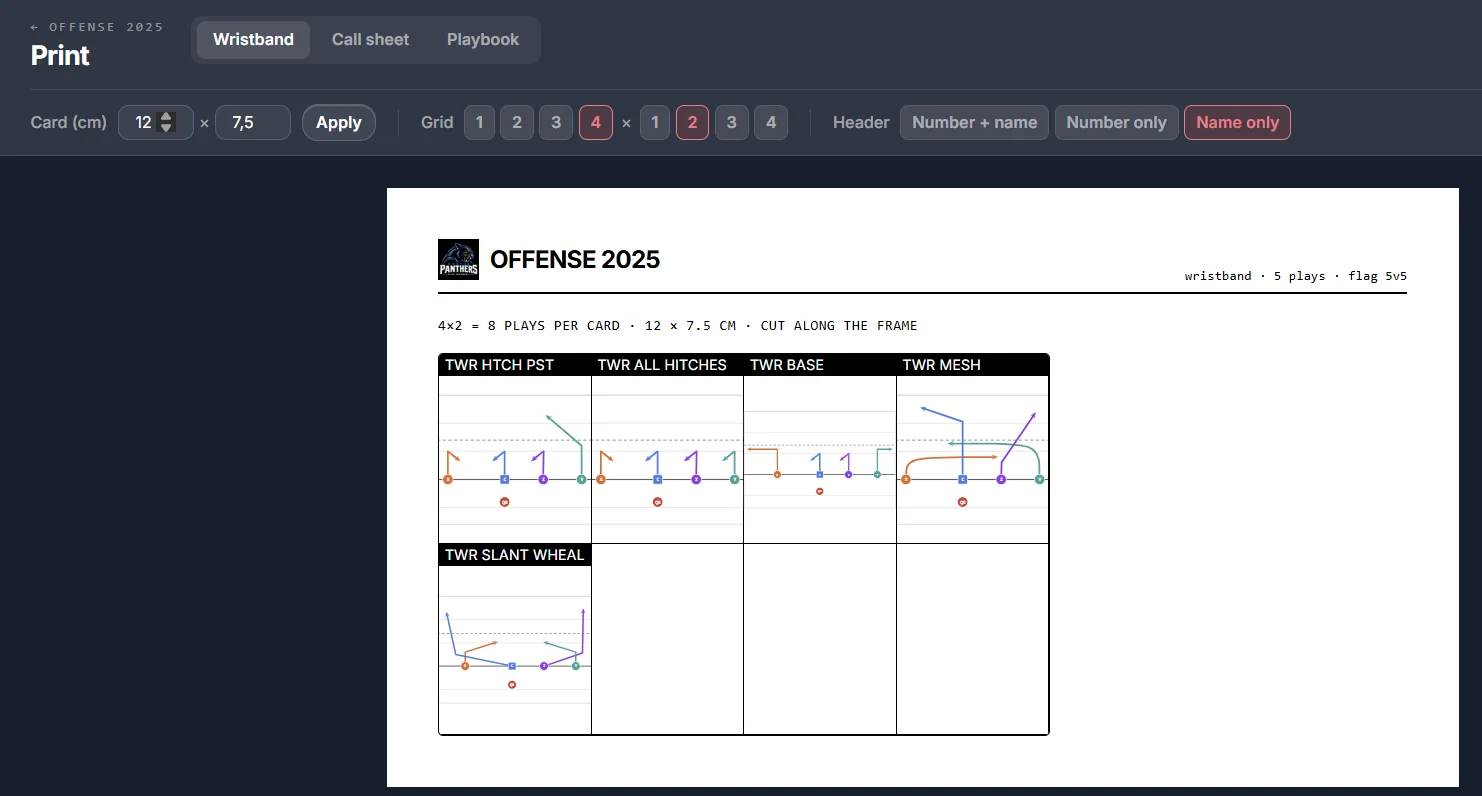
Playbook
The plays stay with the team, not in one coach’s drawer.
Draw a formation, give the players routes and name the play. A team can have several playbooks — offense and defense — and the plays are sorted into folders.
- Draw with a mouse or a finger: formations, routes, blocking, motion, player marks.
- Your own set of formations and routes. The team keeps it and builds plays from it in one tap.
- Mirror a play to the other side — left and right are not two separate drawings.
- Folders in the playbook, in the order you choose.
- Import from Playmaker: the PDF is read and the plays land in your playbook.
- Copy a playbook between the teams of a club.
- Print one, two, four or six plays per page, with notes and player labels.
- Wristband: the same plays on a card for the sleeve, eight to a 12 × 7.5 cm card.
Call sheet & game
The sheet you call from — and tap during the game.
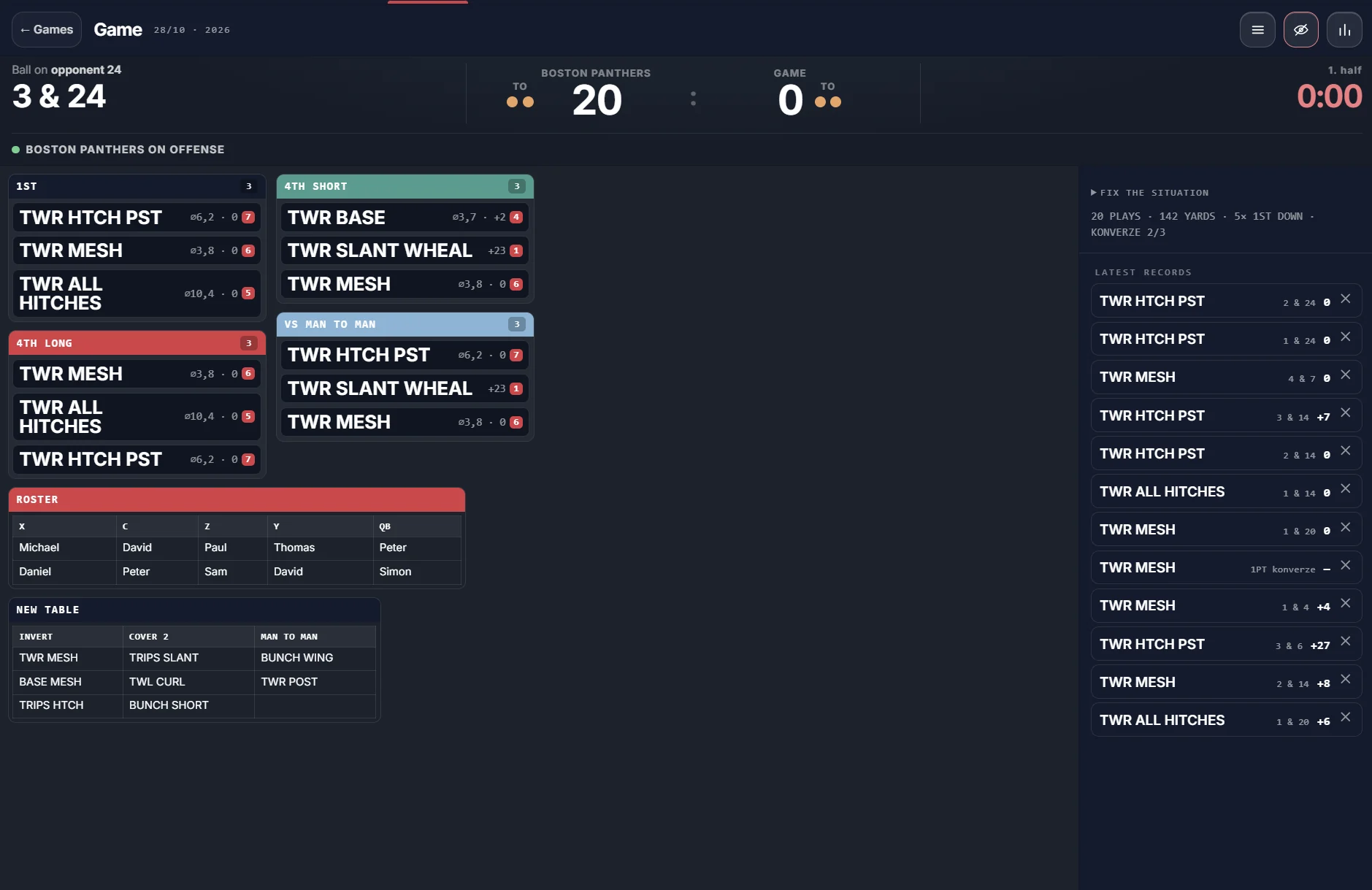
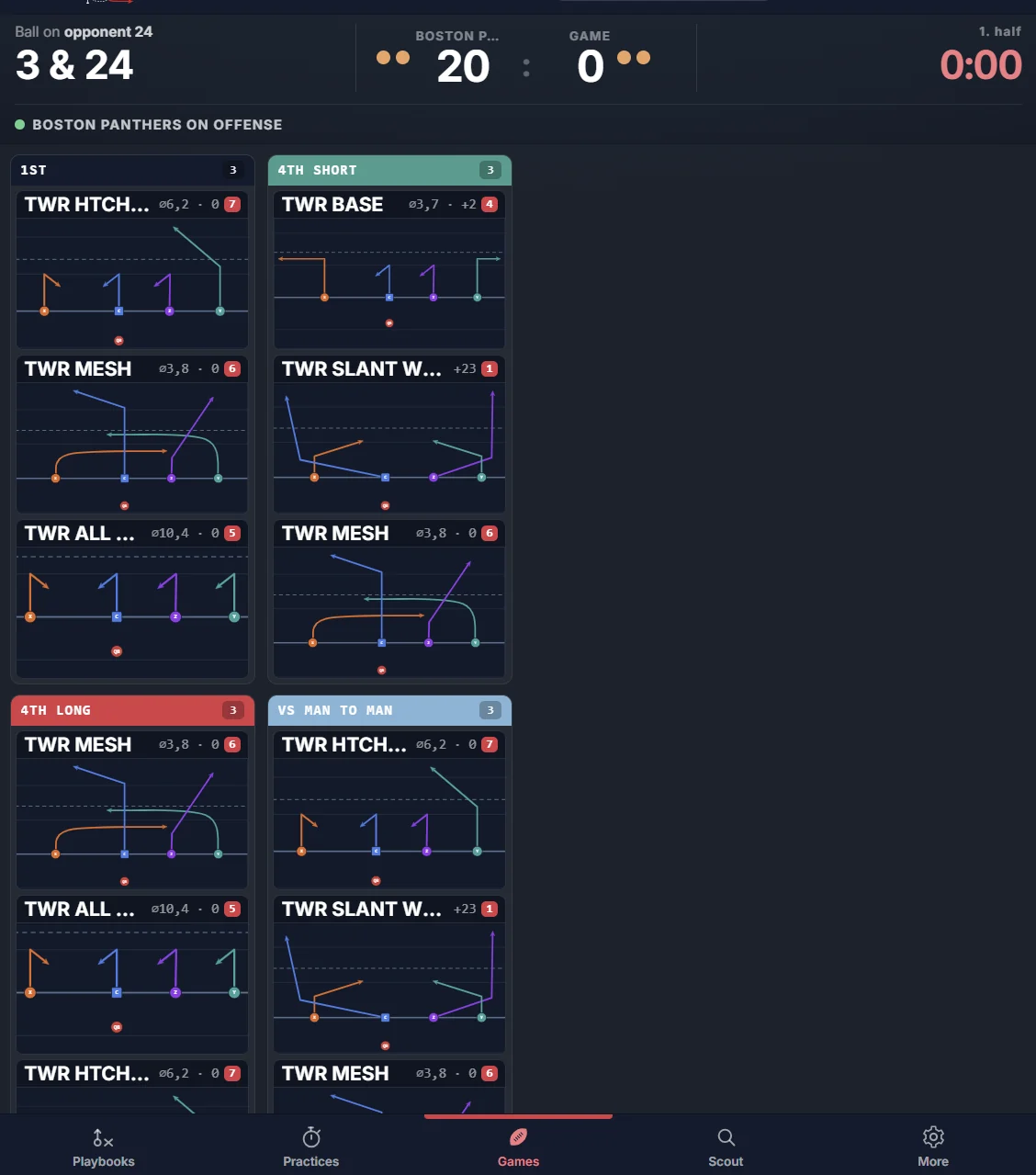
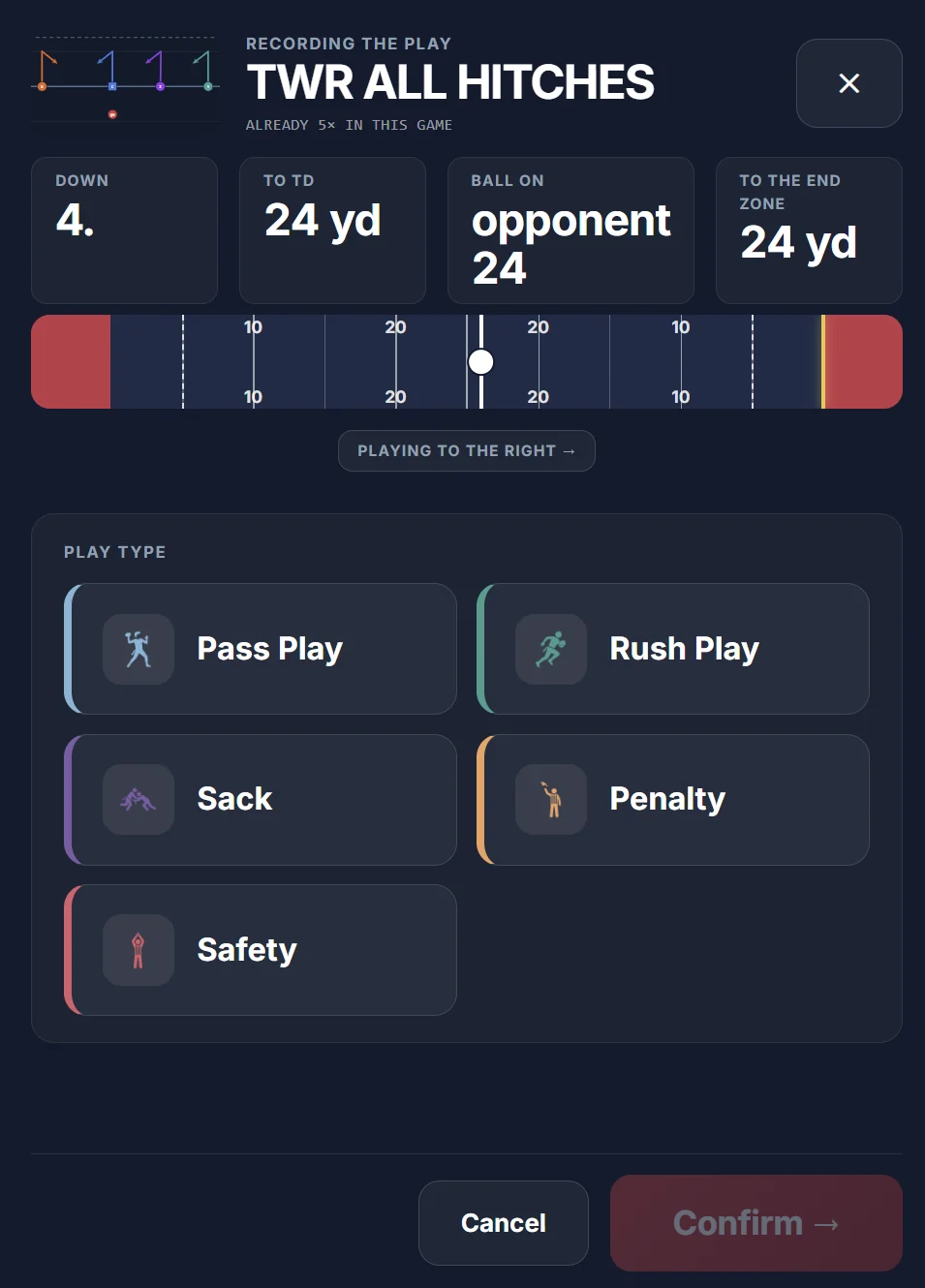
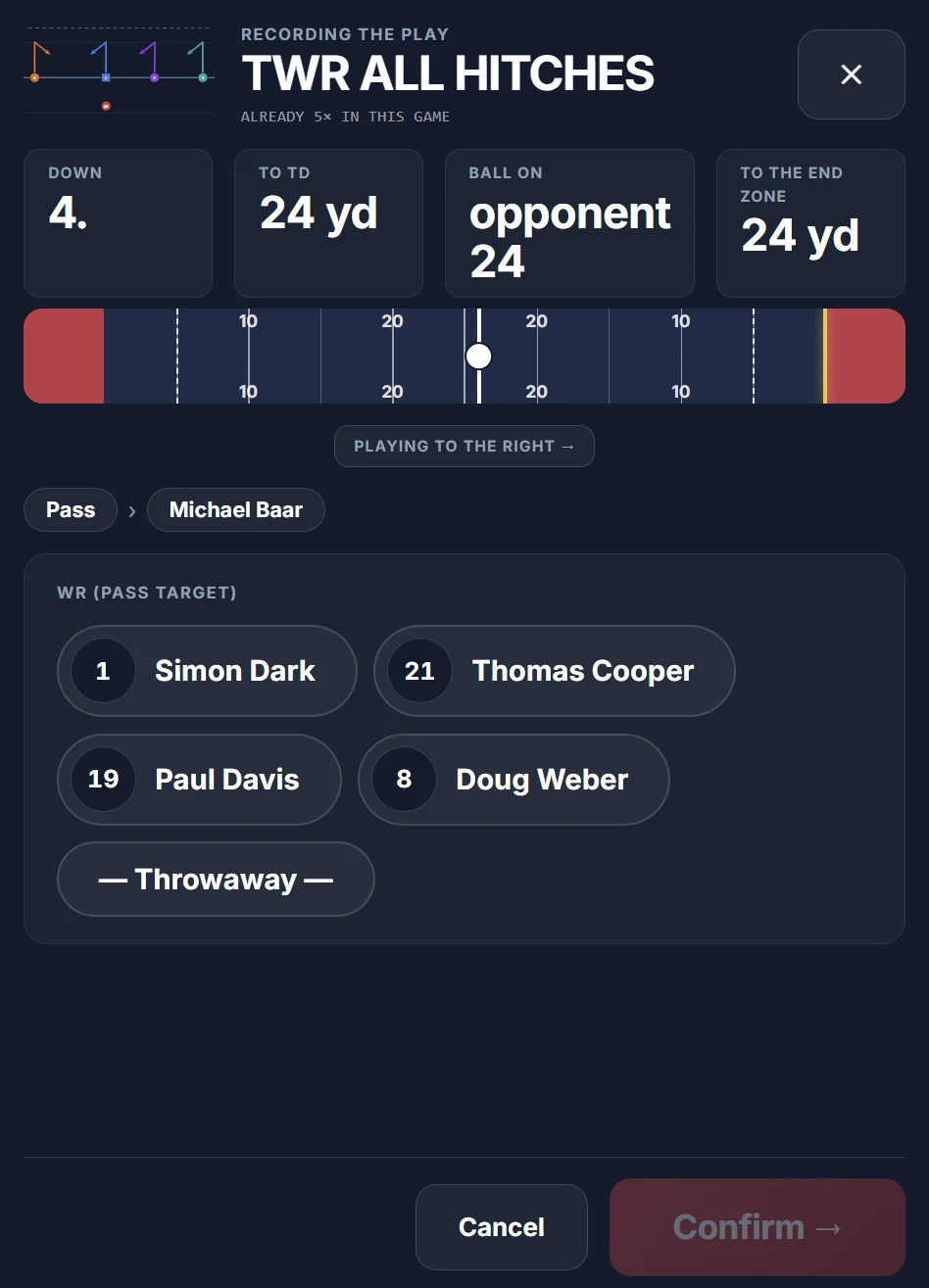
Group the plays into boxes: first down, red zone, third and long. The same sheet is on the tablet during the game — tap the play you called and the wizard asks for the rest: one question per screen.
- Boxes are built by dragging, up to five columns a side, each in its colour.
- Two sides of the sheet — offense and defense, or first half and second.
- A free table for anything that does not belong in a box. Prints on A4, with the drawing or with names only.
- Play type, QB, target, result, yards, who ran — step by step, on big buttons.
- The chain, the downs and the ball position move on their own. No down to type in.
- Conversions, penalties, safeties, interceptions and pick sixes each have their step.
- Two-way games: one coach runs offense and defense and switches sides.
- It keeps going with no signal. The log is kept on the tablet and leaves when the network is back.
- A roster with jersey numbers and positions — players can be pulled from those who have an account.
Report
After the game you know what worked and what you need not have called.
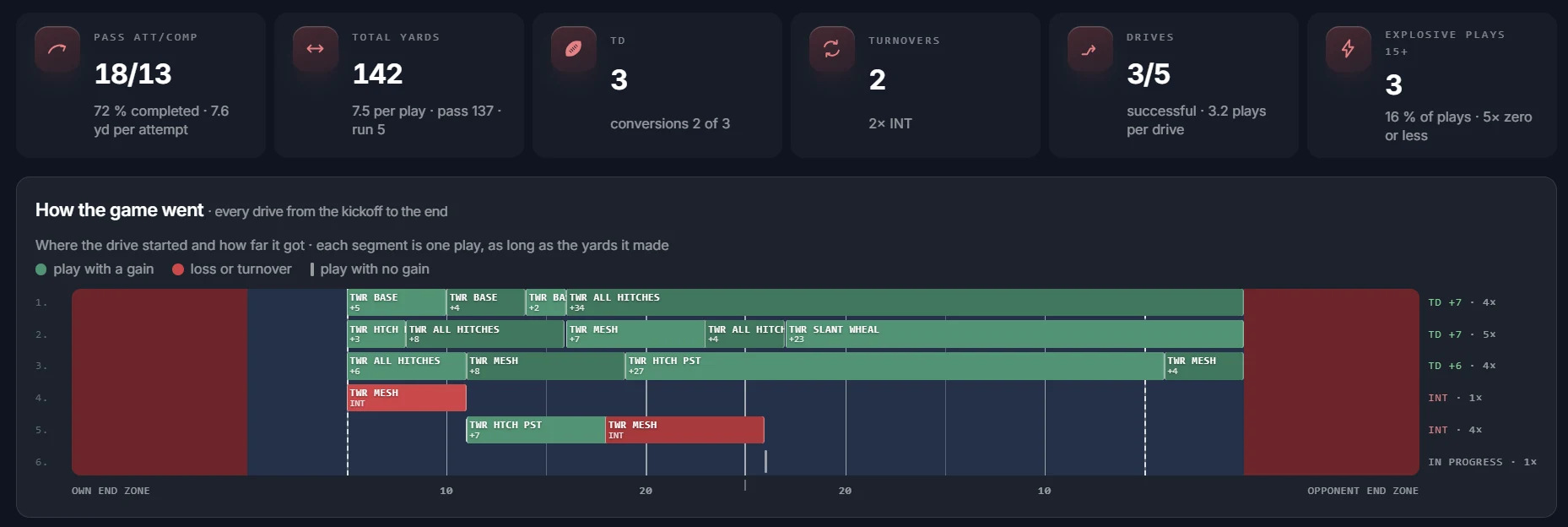
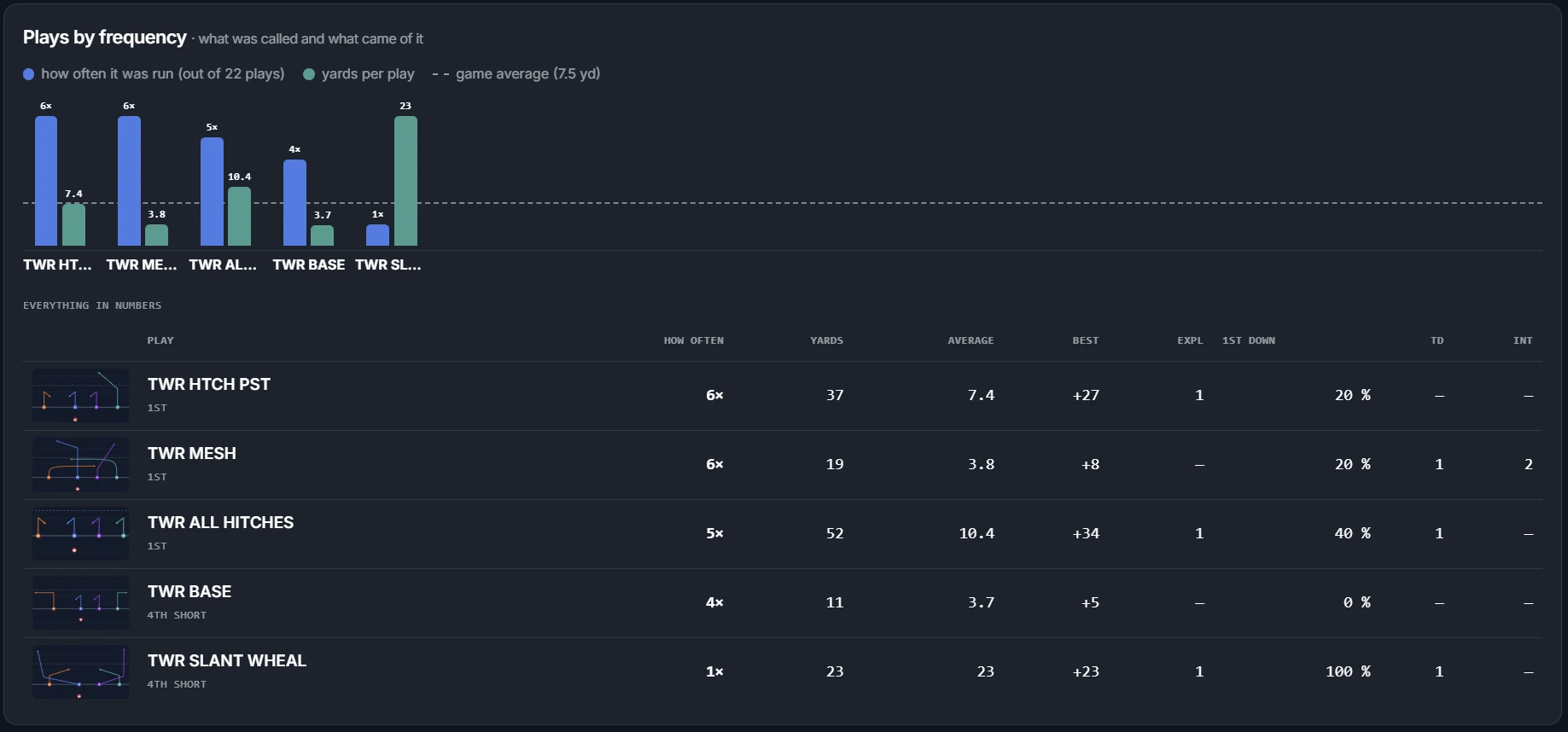
The report builds itself from what you tapped. It is not a table of numbers — it is a strip of drives on the field, how often a play was called against what it gained, and a breakdown by situation.
- The drive strip: where a series started, how far it got and which play moved it.
- Plays by how often they were called, next to their average gain.
- Breakdown by situation, formation, field zone, play type and conversions.
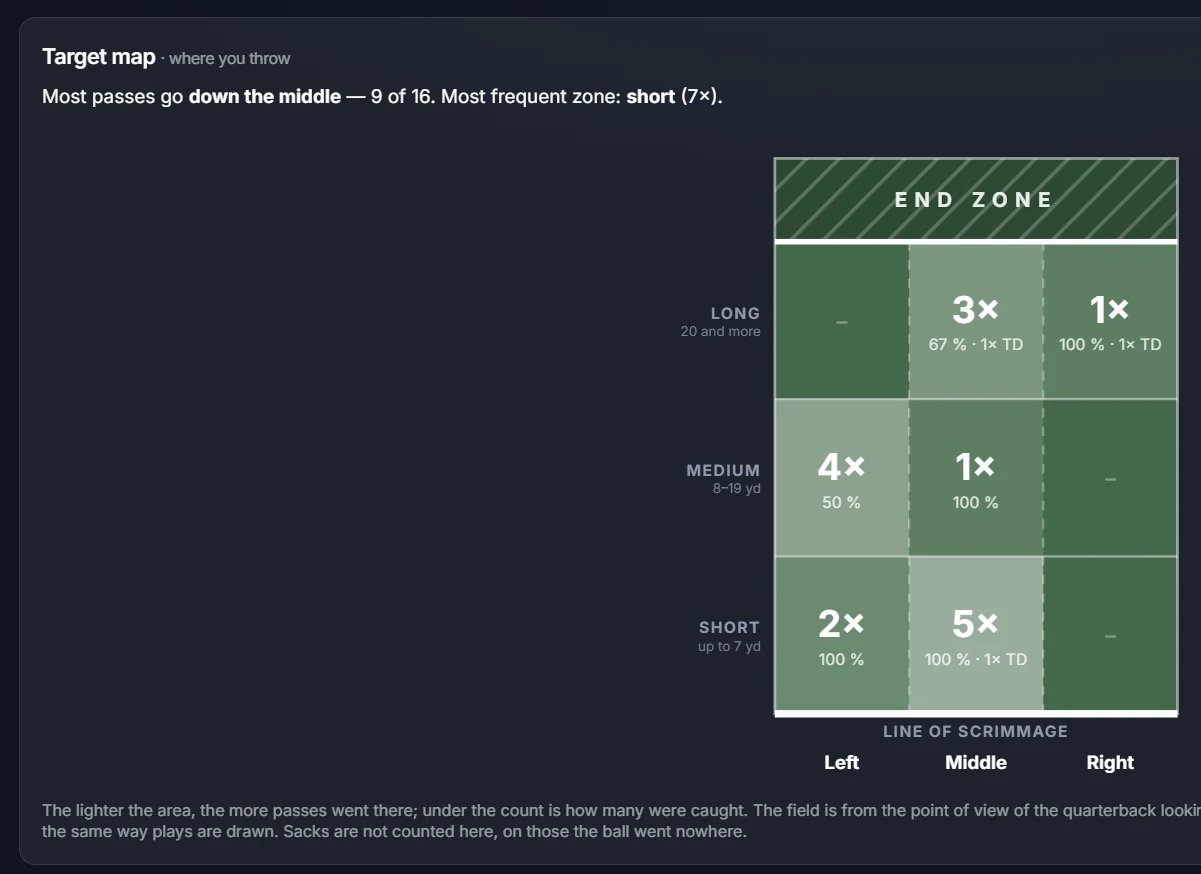
- Target map: where the ball goes and how far.
- Tendencies by down — what the opponent knows about you.
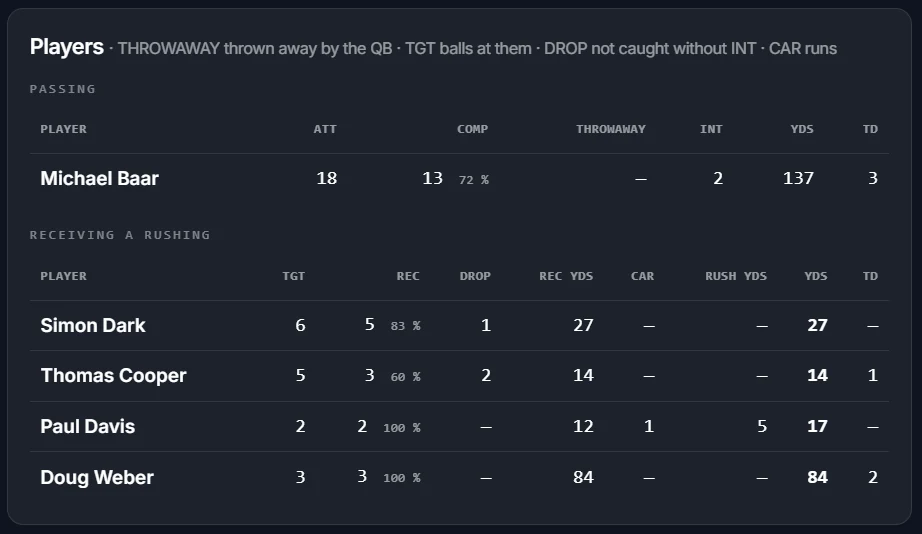
- Player and team stats, and every single log entry in case something looks off.
- A summary report across several games — a season, not one match.
- Prints to PDF with the text and the charts intact.
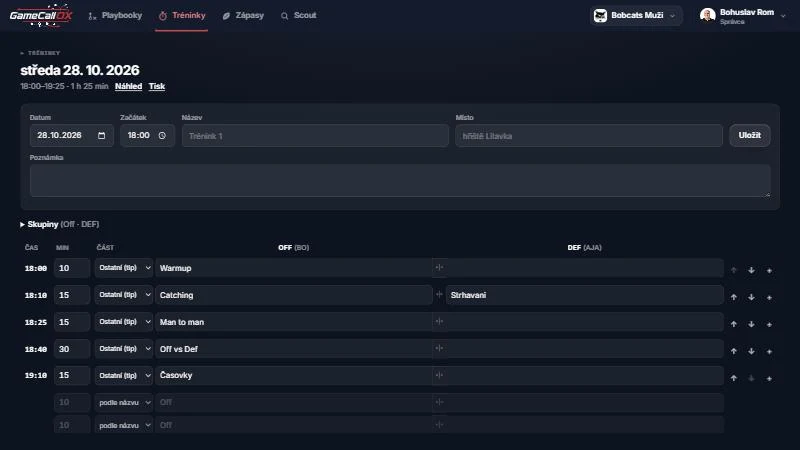
Practices
A practice by the minute, not on a scrap of paper.
The schedule is written as a table: time, what is being done, which group and how long. Past practices stay in the archive, so in January you can see what you did in September.
- A minute-by-minute schedule with several groups side by side.
- A drill library — write a drill once and keep using it.
- A practice log: what you got through and what was played correctly.
- A game at practice is logged like a real one, stopwatch and all.
- Attendance, taken from who opened the app.
- A practice report and an archive of the whole season.
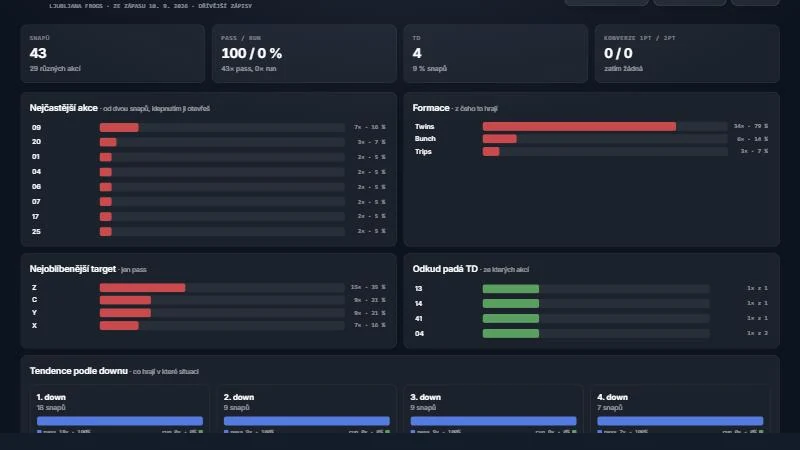
Scouting
What the opponent plays, before they play it.
Their plays are logged with the same drawing as your own playbook, jersey numbers included. A few games in, you can see what they do in which situation.
- Log the opponent’s plays from video or from the sideline, game by game.
- Their most frequent plays and the formations they run them from.
- Their favourite target and where their touchdowns come from.
- Tendencies by down — when they throw and when they run.
- The report prints, so you can hand it out before the game.
- Players can read the scouting; the coach is the one who logs it.
Team
The whole staff, not one shared login.
Everyone has their own account and their own rights. A player reads the playbook, the scouting and the reports; drawing plays, logging games and scouting is the coach’s job. The admin also manages the people.
- Three roles
- Admin, coach, player. The role applies to the team you are in right now.
- Invite by e-mail
- Accounts are not self-served — the admin lets a person into the team.
- Several teams per club
- Men, women, youth. A playbook can be copied between them.
- Roster
- Jersey numbers and positions. The game wizard offers players from it.
On the field
What counts is whether it works in the cold and with no signal.
The app is built for a tablet on the sideline, not for an office. Hence these.
- No signal
- A game in progress and downloaded sheets stay on the tablet and leave later.
- Sunlight mode
- A dark screen is unreadable in direct sun. One tap and it turns light.
- Phone and tablet
- Draw and log from either. Can be added to the home screen as an app.
- Four languages
- Czech, English, German, Spanish. The language belongs to the account.
Connected
A game log can go straight to GameStatiq.
GameCallOX runs the game, GameStatiq turns it into league statistics. With both, the report is sent in one tap and shows up there as a game for the team and the players — roster, drives and penalties included. If you only want to call plays, you do not need it.
Go to GameStatiqHow it works
Three steps and the game is logged.
- 1
Draw the playbook
Draw the plays or import them from Playmaker. The team keeps its own formations and routes.
- 2
Build the call sheet
Group the plays into the sheet you call from. Print it, or keep it on the tablet.
- 3
Log and read the report
Tap the plays during the game. Afterwards you read what worked — before the opponent does.
Pricing
By how many teams you run.
A 14-day trial, free and without a card. You pay for the team, not per coach — how many people you invite is up to you.
Team
One team.
€15 / month
- Unlimited playbooks and plays
- Call sheets, wristbands and printing
- Game logging, signal or not
- Reports and statistics
- Practices and scouting
- As many people in the team as you like
Club
Most chosenUp to five teams on one subscription.
€35 / month
- Everything in Team
- Up to five teams (men, women, youth)
- Playbooks can be copied between teams
- People managed in one place
- One invoice for the club
- Priority support
League
A federation or a league.
On request
- Teams to the size of the competition
- National selections
- GameStatiq connection
- Coach training
- A contract for the season
Prices exclude VAT; the provider is not VAT registered. GameCallOX and GameStatiq are paid for separately — each makes sense on its own.
Questions
What coaches ask.
Do I need internet on the field?
No. A downloaded sheet and a game in progress stay on the tablet, and the log reaches the server on its own once there is signal. You do have to download the sheet while you still have a network.
What if I cannot draw plays?
Formations and routes come ready and a play is built from them by tapping — you really only draw what your team does differently. And a playbook in Playmaker can be imported from the PDF.
Can the players get to it?
Yes, as the player role. They can read the playbook, the scouting and the reports, and print them. Drawing plays and logging games is for coaches.
Does it work for defense?
Yes. Defensive playbooks and call sheets are drawn the same way, and a game can be run two-way — one coach switching between offense and defense.
Can I print it?
Everything that matters: the playbook at one to six plays a page, the call sheet on a page and on a wristband, and reports to PDF with the text and the charts intact.
What happens after fourteen days?
Nothing is charged — nobody asked for your card. We get in touch and agree on the rest. If it is not for you, your data is still there to print.
Do I need GameStatiq as well?
No. The connection is a bonus for those who want the game in the league statistics too. Without it GameCallOX works in full.
What languages is it in?
Czech, English, German and Spanish. Each person picks the language on their own account, so one team can have coaches set differently.
Try it on one game.
Fourteen days free, no card. Draw five plays, build a sheet from them and log one game — then you will see whether the report tells you something you did not know.
Try it free for 14 daysNo card. Nothing is charged when the trial ends — we get in touch.